AWG_API -
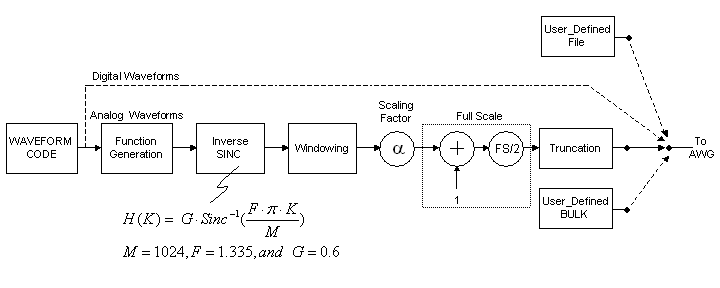
Due to the windowing effects of using time-limited waveform data, the waveform spectrum of analog waveforms will appear to have had a sinc filter applied. The API includes an inverse sinc filter designed to minimize these effects when using a one of the prestored analog waveform styles, such as sine, N-tones, and chirping. Digital waveform styles, such as ramp, pulse, constant, or user-defined, will bypass this filter. After the inverse sinc filter are a windowing feature, a scaling factor to reduce the amplitude of the waveform data, and a positive offset and scaling to bring the waveform output to non-negative values. With the following properties you can adjust these filters.
isinc_freq_scaling_factor (F)
isinc_on
isinc_scaling_factor (G)
window
wv_full_scale (Full Scale)
wv_scaling_factor (α)
isinc_freq_scaling_factor
Description
This property scales the frequencies to which the inverse sinc filter will be applied.
Syntax
Read
Gets the current inverse sinc filter frequency scaling factor
Example
double F;
F = awg.isinc_freq_scaling_factor;
Write
Sets the inverse sinc filter frequency scaling factor
Example
awg.isinc_freq_scaling_factor = 1.335;
Notes
This is the factor F in the diagram at the top of this page.
isinc_on
Description
Specifies whether or not to use the inverse sinc filter.
Syntax
Read
Sees if isinc filter is on
Example
bool isincStatus;
isincStatus = awg.isinc_on;
Write
Enables or disables isinc filter
Example
awg.isinc_on = true;
Notes
If you see that your spectrum appears to have been attenuated by a sinc function, you should try to use this inverse sinc filter.
isinc_scaling_factor
Description
This property scales the amplitude of the inverse sinc filter to be applied.
Syntax
Read
Gets the current inverse sinc filter amplitude scaling factor
Example
double G;
G = awg.isinc_scaling_factor;
Write
Sets the inverse sinc filter amplitude scaling factor
Example
awg.isinc_scaling_factor = 0.6;
Notes
This is the factor G in the diagram at the top of this page.
window
Description
Specifies which type of windowing to use.
Syntax
Read
Finds which type of windowing is being used
Example
int currentwindow;
currentwindow = awg.window;
Write
Sets the type of windowing to use
Example
awg.window = 0;
Notes
The four available windowing types (0,1,2,3) are rectangular, Blackman, Hamming, and Hanning. If your waveform is a digital waveform (e.g., ramp, pulse, constant, or user-defined), any window settings will have no effect. If it is an analog waveform (e.g., sine, n-tones, chirping), then the window will be applied after the inverse sinc filter.
wv_full_scale
Description
This property determines the number of amplitude resolution points in the full scale output waveform.
Syntax
Read
Gets the current value of the full scale amplitude.
Example
unsigned FullScale;
FullScale = awg.wv_full_scale;
Write
Sets the full scale amplitude of the output waveform
Example
awg.wv_full_scale = 0x1000;
Notes
This is the number of amplitude points to use for the full scale and is indicated
by FS in the diagram at the top of this page. This value must
be a natural number (positive integer).
Please note that the maximum full scale is 4096 points (0x1000) for the AWG252 and
the AWG452, while the maximum full scale is 2048 points (0x800) for the AWG801.
wv_scaling_factor
Description
This property scales the waveform proportionally.
Syntax
Read
Gets the current value of the waveform scaling property.
Example
double alpha;
alpha = awg.wv_scaling_factor;
Write
Sets the waveform scaling factor.
Example
awg.wv_scaling_factor = 0.975;
Notes
Please use a positive number less than 1. If truncation of the waveform occurs, particularly with two-tone or multi-tone waveforms, when the component tone waveforms add in-phase beyond the maximum amplitude, please use this scaling factor to reduce the total power of your waveform.