
General Description
The Euvis AWG801 modules generate arbitrary CW waveforms with sampling rates up to 8 GSPS. The on-board SRAMs provide up to 8M x 11-bit data memory. The AWG modules can be controlled by a PC via a USB interface or can work alone with pre-stored waveforms. The sole RF input is a single-ended clock source CK, which can be operated up to 4 GHz with minimum power of 10 dBm. The RF outputs of the module are comprised of differential analog outputs, with 50-Ω back termination. The module accepts a high-speed trigger signal and generates three programmable marker signals. The waveform generation can be in continuous or burst/pulse mode. The waveform contents can be dynamically changed using the user page selection. Programmable profile option facilitates compound waveforms. The companion API provides an interface for software development.
Ordering and Pricing Information
For pricing information, please visit Pricing. For formal quotations, availabilities, and quantity-specific orders, please contact us
Key Features
- 11-bit DAC with 10-bit linearity
- Standard AWG has sampling rate of 8 GSPS with 4 GHz external clock
- Optional 4 GHz internal clock with 10 ~ 100 MHz reference clock
- Optional sampling rate range: 4 ~ 8 GSPS with 2 ~ 4 GHz external clock
- Up to 8M x 11-bit words memory depth with multi-page configuration
- Up to 1 millisecond waveform at 8 GSPS
- Accepts external trigger and generates programmable marker signals
- Programmable cyclic length
- USB 2.0 compliant interface
- 12V power supply
- User-friendly input data formats and various built-in waveforms
- Companion API and software drivers for easy system development
- API compatible with Matlab 2010a
- API compatible with LabView
- Multi-AWG synchronization
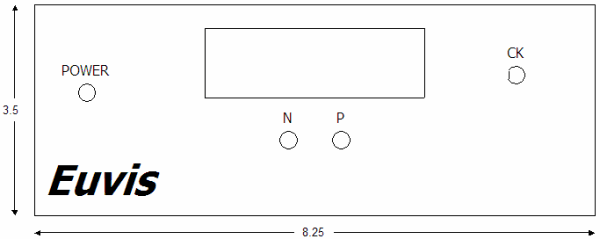
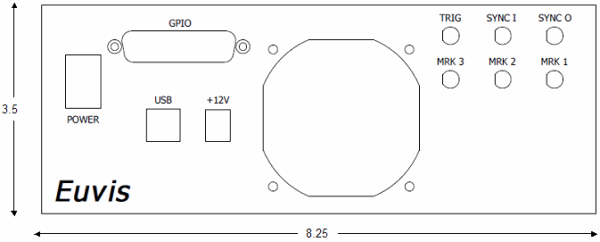
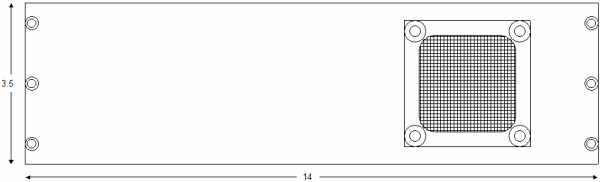
- Aluminum anodized enclosure: 8.25 x 3.5 x 14.0 (W x H x D) inches
Applications
The flexibility of Euvis AWG modules to generate arbitrary patterns with high sample rates, dynamic page selection, and continuous or burst mode operation allow the AWG to be used for a variety of applications, such as:
- Linear Frequency Modulation (LFM) and chirping
- Frequency Modulated Continuous-wave radar (FMCW)
- Agile LO frequency synthesis
- Electronic warfare
- RF signal source generation
- Fast frequency hopping
- VSAT satellite communications
- Test and measurement equipment
Graphical User Interface Application

» To download the AWG Software, API, and Manual, please click here.
Functional Specifications
| GENERAL | |
| DAC Resolution | 11 bits |
| Running Modes |
Continuous
Triggered Continuous Triggered Burst |
| User Interface |
USB
GUI for Windows XP and Win 7 |
| INPUT CLOCK | |
| Type | Single Ended, 50-Ω terminated |
| Connector Type | SMA |
| Frequency Range |
Standard: 4 GHz
Optional: 2 GHz to 4 GHz |
| Power Level | 10 to 14 dBm (typical 12 dBm) |
| OUTPUT | |
| Type | Differential, 50-Ω terminated |
| Connector Type | SMA |
| Output Rate |
Standard: 8 GSPS
Optional: 4 ~ 8 GSPS |
| Output Level | -635 mV to 0 V |
| Output Power | -4 dBm to 0 dBm |
| Residual Phase Noise @ 10kHz from Carrier | -130 dBc/Hz |
| Output Return Loss | 15 dB |
| TRIGGER | |
| Connector | SMA |
| Source | External or Software |
| Recommended External Trigger | LVCMOS/LVTTL 3.3V |
| WAVEFORMS | |
| Max Waveform Length | 8,290,560 samples |
| Minimum Waveform Length (continuous mode) | 256 samples |
|
Minimum Waveform Length (burst mode) |
1280 samples |
| Shorter waveforms can be achieved by Null padding | |
| MARKERS | |
| Number of Markers | 3 |
| Marker 1 Level | LVCMOS/LVTTL 1.8V |
| Marker 2 Level | LVCMOS/LVTTL 3.3V |
| Marker 2 Additional Features | Polarity, Enable, Filter |
| Marker 3 Level | LVCMOS/LVTTL 3.3V |
| Marker 3 Additional Features | Polarity, Enable |
| Marker Length | User defined |
| Minimum Marker Length | 64 samples |
| API | |
| Version | Euvis API 2.0 |
| CLR Language Support |
Visual C++
Visual C# Visual Basic Visual J# |
| Third Party Support | Compatible with Matlab 2010a and LabView |
| OPTIONS | |
|
Programmable profiles
Variable clock frequency for external clock (2 ~ 4 GHz) Internal 4 GHz clock with pre-selected 10 ~ 100 MHz reference clock |
|
Electrical Specifications:
| Parameter | Symbol | Min | Typical | Max | Unit |
| Output Level | Vout | -635 | 0 | mV | |
| Output Power | Pout | -4 | 0 | dBm | |
| Output Phase Noise | Nφ | -130 | dBc/Hz | ||
| Output Port Return Loss | RLRF | 15 | dB |
Multiple AWG's Synchronization:
Multiple AWG's can be operated to generate synchronized waveforms. The synchronization requires:
[1] All AWG's use the same clock source, or use clock sources phase-locked to each other. If use internal clock, all AWG's must use the same reference clock.
[2] All AWG's use the same trigger signal.
[3] The trigger signal is phased-locked (aligned) to the /32 clock. The SYNCO signal is a /32 clock, which can be used to phase lock the trigger signal.
[4] Fine adjustment can be done by specifying the delay in common parameters to further minimize the relative delay of AWG's outputs.
For details, please see synchronization.
Programmable Profiles (*option)
In normal burst mode, the AWG can only output one waveform specified in the user page for each trigger signal. To change the waveform, users have to set the user page in the operations. Setting the user page or other relevent parameters may not be practical for tight timing and sophisticated waveform sequences.
With programmable profiles, users can specify user page sequences, loop counts, and auto trigger periods in the "Programmable Profiles" dialog window in the GUI or by API methods.
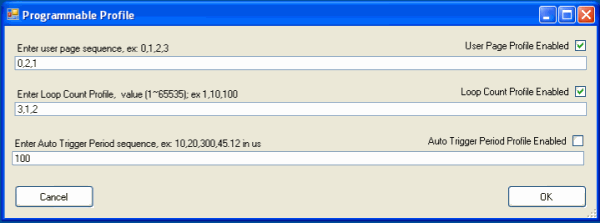
Each separate waveform is downloaded to separate user pages and the sequence in which the waveforms are
output is defined in the "User Page Sequence" textbox at the top. In the example above, the sequence
of waveforms would be Userpage 0, Userpage 2, Userpage 1, Userpage 0, Userpage 2 and so on.
Users can also define the loop count for each trigger signal. The loop count sequence is defined in the "Loop Count Sequence" textbox. In the example above, Userpage 0 will loop 3 times back to back for the first trigger signal, then Userpage 2 will loop once for the second trigger signal, and finally, Userpage 1 will loop twice for the third trigger signal. The number of loop count sequence does not necessarily have to match up with the number of user page sequence. For example you can have a sequence of 3 user pages but you may only have 2 loop count sequences. If the Loop Count Sequence was defined as "3,1" in the above then Userpage 0 will loop 3 times back to back, then Userpage 2 will loop once, then Userpage 1 will loop 3 times, then Userpage 0 will loop 1 time and so on.
The third profile is for the auto trigger period. In normal operation, auto trigger period is a constant, which is specified in the Auto Trig textbox. With the programmable profile option, users can program the periods of auto trigger signal to match the timing requirements for compound waveforms generated by the userpage and loop count profiles.
The image below shows a graphical representation of the waveforms depicted in the GUI screenshot above.

The GUI screenshot below demonstrates a different programmable profile. For this profile, you will
notice that there are 3 user pages but only 2 values each for the loop count and auto trigger sequences.
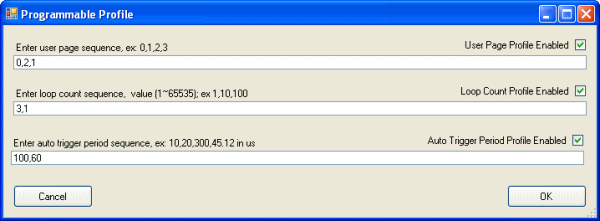
For this example, the Userpage sequence will be: Userpage 0, Userpage 2, Userpage 1, Userpage 0, Userpage 2,
Userpage 1, and so on. The loop count sequence will be: 3 loops, 1 loop, 3 loops, 1 loop, 3 loops, and so
on. The auto-trigger period sequence will be: 100 us, 60 us, 100 us, 60 us, 100 us, and so on.

Enclosure Information
| Enclosure Dimensions | |
| Length | 14.0 inches |
| Width | 8.25 inches |
| Height | 3.50 inches |
Enclosure Drawings
Front Panel
Back Panel
Side Panel
Detailed Datasheet:
To get the complete AWG801 datasheet, please click here.
Email: info@euvis.com to get pricing information.