Using the user_define_bulk method to generate pulses -
This example will take you through some of the methods and properties of the API. If you are unsure of any of the methods or properties please refer to them in the detailed descriptions in the Methods and Properties sections.
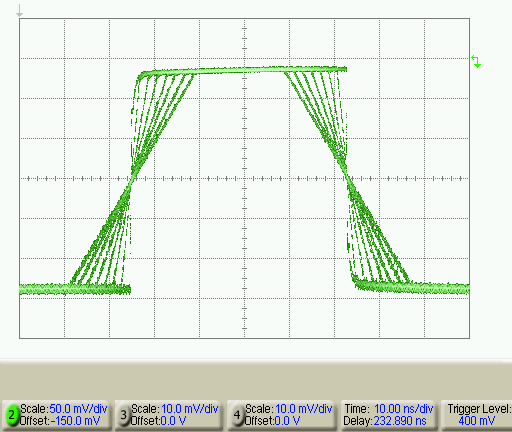
This example uses the user_define_bulk method to generate an output waveform comprising eight pulses with different rise and fall times and another output waveform comprising a 1010 (high-low-high-low) clock pattern.
For convenience here is the source code:
Object Instantiation
AWG_Group_API	awg_group;
AWG_API		awg;
The above code creates an object of the AWG_Group_API class called "awg_group" and an object of the AWG_API class called "awg". When you want to access any of the methods or properties in the AWG_Group_API you must use the "." operator and the "awg_group" object name. For example, if you wanted to read the number of existing AWG modules, you could write the following:
int AWG_totalmodules;
AWG_totalmodules = awg_group.number;
When you want to access any of the methods and properties in the Common_API class or the AWG_API class you must use the "." operator and the "awg" object name. For example, to set the waveform code you should write the following:
awg.code = (unsigned) WAVEFORM_CODE::USER_DEFINED;
Valid waveform codes and other properties and methods are enumerated in the API and should automatically pop up in your programming environment as long as you have already referenced the API.
Board Initialization
int SeriesNumber = awg_group.get_sn(0);
Gets the Series Number of the AWG module and stores it into the integer variable "SeriesNumber". The "0" argument
is the module's index number. The indicies enumerate
the existing AWG modules, starting from 0. The example assumes that there is only one AWG module connected. When there is only one AWG module connected, its index number will always be 0.
awg.ini( SeriesNumber );
Initializes the AWG module. This step is very important and must be done before sending any commands to the AWG module of that Series Number.
Note that the argument being passed into the member function is the Series Number of the board, not the index number.
Board Setup
awg.signature_ini_dir( "C:\\Program Files\\Euvis\\AWG" );
if( !awg.is_signature_file_exist )
{
	...
}
awg.Clock_Frequency = 4e9;
The signature_ini_dir() function sets the path for your module signature file while the Clock_Frequency sets the input clock frequency. The Clock_Frequency property of course should match your real input clock frequency, and you should ensure there is a copy of the signature file for the module you are using in the directory you specified.
Configuration Setup
awg.memory_depth = 0x100000;
awg.loop_count = 0;
The above two lines set the memory depth and put the module in infinte/endless loop mode.
Waveform Setup
awg.user_page = 0;

int	i;
int	numOfPoints	= 0x1000;
int	period		= 0x200;
int	width		= 0xc0;
int	TSTART		= 0x80;
int	markerwidth 	= 0x20;
unsigned *u = new unsigned[numOfPoints];
unsigned *c = new unsigned[numOfPoints];
const unsigned AMP	=  0xFFF;
for (...)
{
	...
}
awg.user_define_bulk( u, c, numOfPoints );
awg.data_length = numOfPoints;
awg.code = WAVEFORM_CODE::WAVEFORM_USER_BULK;

delete u;
delete c;
The above code defines eight pulses with varying rise/fall times. The marker occurs eight times, once for each pulse, and the marker signal has the same width for each occurrence and for each of the three markers. Please refer to the Properties section for a detailed description of each property.
Optional: Debugging tip
Write the data to a file on your computer for you to see if that data is what you expect.
    FILE	*fout = fopen( "eightpulses.log", "w+" );
    ...
    fclose( fout );
Download Waveform
Downloads the waveform you specified to the hardware.
awg.stop();
awg.download();
Start Waveform
The module will continually output the waveform on page 0 (the eight pulses).
awg.user_page = 0;
awg.stop();
awg.flush();
awg.restart();
The four lines above should be used every time you want to run a downloaded waveform. The stop function stops all activity on the AWG board. The flush function resets the memory address to 0. The restart function sends the signal to run the AWG memory and start the waveform.
Now you are ready to try the example code. Ensure that your module is set up with the proper clock and power sources, with a small cooling fan blowing air across the module, and with a USB connection to your computer. Ensure that your compiler is set up with Common Language Runtime Support and with the Multi-threaded DLL Runtime Library, and, most importantly, ensure that your solution references the API Euvis_Module_V1p2.dll.
Compile the example code. Make sure there is a copy of the module signature file AWGyyy_SGN_xxx.dat, where the three digits xxx should be replaced by the serial number of your module(s) and yyy should be replaced by 252, 452, 801, 272, or 472, in the directory you specified. Run your executable file PulseEx.exe. If you have connected one of the module outputs to your oscilloscope, you should see the example waveform represented in the following image. Please note that if your oscilloscope does not sample the waveform quickly enough, you may see only a few of the eight pulses.
while( 1 )
{
	scanf( "%d", &i );
	...
}
The above lines check if the user has typed a nonzero page number and change the user page to 1 or 0. From the command window where you ran the executable file, type the number 1. The module output should change to the 1010 clock pattern on user page 1. Type the number 0, and the module output will return to the eight pulse pattern on user page 0.