Memory Depth and Data Length -
The choices of memory depth and data length and the number of data values that you have will affect the output of your waveform. First, recall that the memory depth must be greater than or equal to the data length, and the data length should be greater than or equal to the number of values. As a result, we have the following necessary condition:
Number of Data Values + Delay
 Data Length
Memory Depth
4,194,304
Data Length
Memory Depth
4,194,304
The above must be satisfied in order to have proper waveforms. The AWG stores amplitude data as data words. There are a total of 4 X 1,048,576 memory addresses available, each able to store a 12-bit data word. The AWG stores the data in special ways depending on the data length and memory depth parameters. An example will help you see exactly what is going on.
Assume that you have specified 10 data values in your waveform and you have set Memory Depth = 16 and Data Length = 12 (satisfying the necessary condition, above). By setting those parameters, you will have made 16 memory addresses available (from the Memory Depth value) but only 12 of those memory addresses will have been made available for your waveform data (Data Length value). The AWG stores the 10 user specified values in the first 10 memory addresses, but since there are still two more memory addresses available for data (Data Length – number of data values), it copies the first 2 values again in the remaining memory addresses made available by the Data Length. There are still 4 more memory addresses available (Memory Depth – Data Length) so the remaining 4 memory addresses will be stored with the user specified starting value. The images below illustrate the example of a ramp waveform:
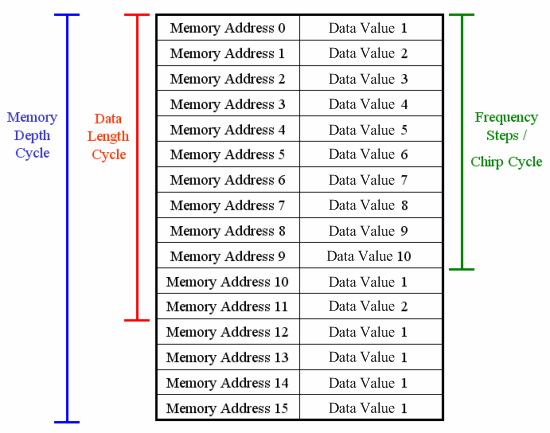
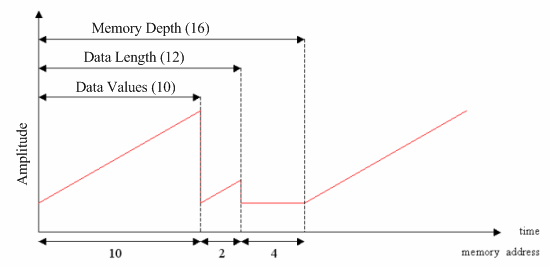
When you operate the AWG with these settings, the module will run through all 16 memory addresses in the Memory Depth cycle and then start over again.
In the discussion below, there are three cycles to be aware of: Memory Depth cycle,
Data Length Cycle, and waveform cycle.
One Memory Depth cycle goes through all of the memory addresses
made available by the Memory Depth parameter. In the above example, one Memory Depth
cycle would be 16 memory addresses.
One Data Length cycle goes through all of the memory addresses
made available by the Data Length parameter. In the above example, one complete
Data Length cycle would be 12 memory addresses.
One waveform cycle goes through
every value in the user defined waveform. In the above
example, one complete waveform cycle has 10 memory addresses, since there are 10 data values.
There are six different ways you can manipulate the output with the Memory Depth and Data Length parameters.
1. Memory Depth = Data Length = Number of Waveform Data Values
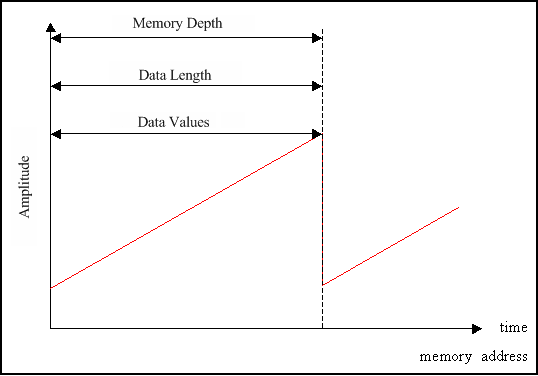
In one Memory Depth cycle, the AWG will run through all of the desired values exactly once. For example, if you had 64 data values, and Data Length = Memory Depth = 64, then all of the 64 values would be output once during each Memory Depth cycle.
2. Memory Depth = Data Length = n X Number of Waveform Data Values
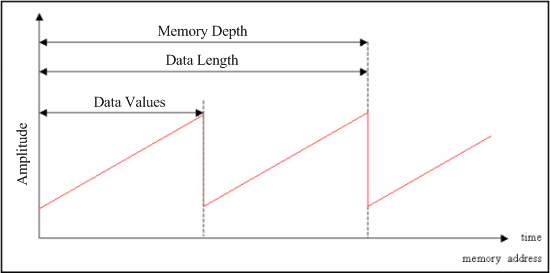
In one Memory Depth cycle, the AWG will run through all of the desired data values n times. The image above illustrates the case of n = 2. For example, if you had 32 data values and Data Length = Memory Depth = 64, then each value in the waveform would be output twice during each Memory Depth cycle.
3. Memory Depth = Data Length > Number of Waveform Data Values,
but Data Length is not n X Number of Waveform Data Values
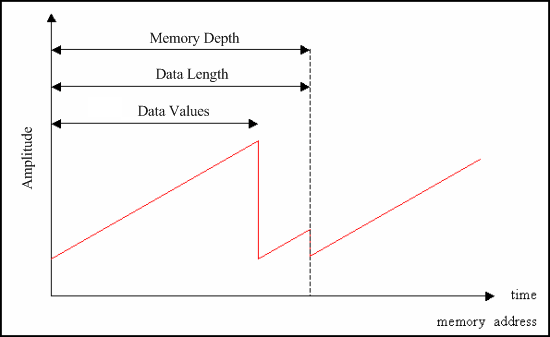
In one Memory Depth cycle, the AWG will run through one waveform cycle and repeat a fraction of the waveform cycle again until the start of the new Memory Depth cycle. For example, if you had 50 data values and Data Length = 64 and Memory Depth = 64, then all 50 data values would be output during the first waveform cycle, but only the first 14 data values would be output during the next waveform cycle, since you then would have reached the end of the Data Length and Memory Depth cycles.
NOTE:
The next three outputs are not available if Data Length Enabled is checked in the Memory Depth section of the Waveform window. All outputs will resemble waveform #1, #2, or #3 above, since Memory Depth will always be equal to the Data Length.
4. Memory Depth > Data Length = Number of Waveform Data Values
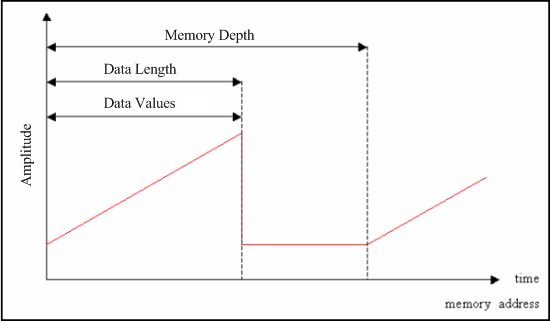
In one Memory Depth cycle, the AWG will run through one waveform cycle followed by only the starting value until the start of the next Memory Depth cycle. For example, if you had 30 data values and Data Length = 30 and Memory Depth = 64, then after all 30 values of the waveform cycle were output, the AWG would only output the starting value for the next 34 memory addresses.
5. Memory Depth > Data Length = n X Number of Waveform Data Values
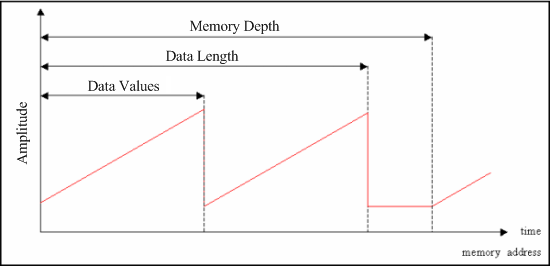
In one Memory Depth cycle, the AWG will run through n waveform cycles and after the nth waveform cycle will only output the starting value until the start of the next Memory Depth cycle. The image above illustrates the case of n = 2. For example, if you had 25 data values and Data Length = 50 and Memory Depth = 64, then for each Memory Depth cycle, each waveform cycle would be output twice consecutively followed by 14 memory addresses of the starting value.
6. Memory Depth > Data Length > Number of Waveform Data Values,
but Data Length is not n X Number of Waveform Data Values
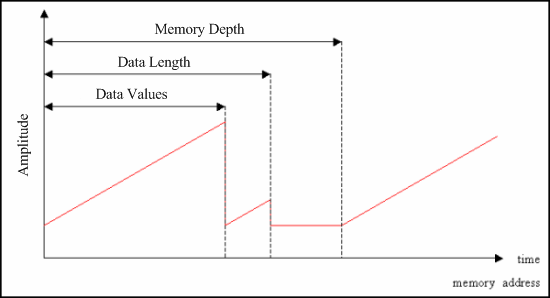
In one Memory Depth cycle, the AWG will run through one waveform cycle and repeat a fraction of the waveform cycle again until the end of the Data Length cycle is reached, after which only the starting value is output until the AWG reaches the end of the Memory Depth cycle. For example, if you had 40 data values and Data Length = 50 and Memory Depth = 64, then all 40 values of the waveform cycle would be output first. Then, the first 10 values of the waveform cycle would be output again, after which only the starting value would be output until the end of the Memory Depth cycle, which is the remaining 14 memory addresses.