Loading Waveforms -
There are two ways you can load waveform files.
The first way, which is detailed below, is simply loading a saved .wfa file from a previous session with the GUI application.
The second way involves entering a waveform code corresponding to
a waveform style
for which you then enter specific parameters. For details on
using the waveform codes, please go to the Waveforms page.
Waveforms previously saved
Waveform files saved from a previous session in the GUI application can be loaded easily. The files have the extension .wfa and are stored in your application folder or the user-defined waveform directory.
» With the program open, click on the Waveform tab if you are not already in the Waveform Window.
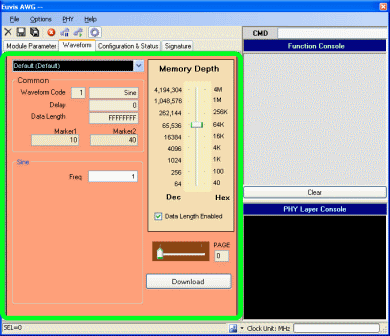
» Click on the pull-down bar and select one of the saved waveforms. After clicking
on the waveform, the board will output the waveform if "Auto Download" has been enabled. If
it is not enabled, click on Download Waveform near the bottom of the
window or click on File --> Load Waveform.
Waveform codes
For details on using the waveform codes, please go to the
Waveforms page.