Firmware Update -
All new firmware will be accompanied by a GUI application so that the functions will match. To update the firmware, please follow the instructions below.
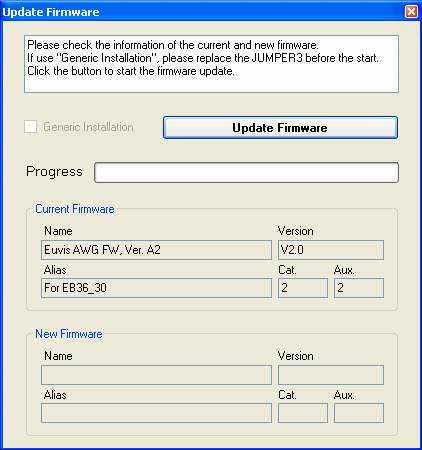
For normal firmware updating, power up the AWG board with a jumper on JP3 and click on PHY --> Firmware Update to bring up the above dialog box. The dialog box will display the current version of the firmware on the device and the new firmware that you will write to the ROM. Confirm that the name of the new firmware identifies that to which you want to update, and then simply click on Update Firmware to begin the process. It will take approximately 30 to 60 seconds to complete. To register the changes to the application, close the application and power down the AWG board. Power up the board, and wait for the demo waveform to show up. Open the application. To verify that you have successfully updated the firmware, click on PHY --> Firmware Info, and it should show the new firmware information.
If there is a problem, we recommend that you perform a Generic Installation. To do this, with the AWG off, remove the jumper from JP3 on the board. Power up the device and launch the AWG application. Go to PHY --> Firmware Update to open the dialog box. Place the jumper back on to JP3. Now click on Update Firmware to begin writing to the ROM. To register the changes to the application, close the application, power down the board, and then power up the board. When you open the program again and click on PHY --> Firmware Info, it should show the changed firmware information.