Paging Option -
The AWG module features memory address paging. The firmware controls three address lines to determine which one of eight possible 15-bit address pages to use.
The total memory is the same, whether you use eight 15-bit pages, four 16-bit pages, two 17-bit pages, or one 18-bit page. Maximum data length waveforms require that fewer pages be used, however shorter data length waveforms can use paging to allow you to switch rapidly between multiple waveforms.
If you would prefer to use the full-length 18-bit memory address without paging, or if you would like to use only two or four pages, please follow the directions below to modify the board slightly to select the non-paging option.
It is necessary to modify the board this way (instead of using a shunt across header pins) due to the high operational speed of the board.
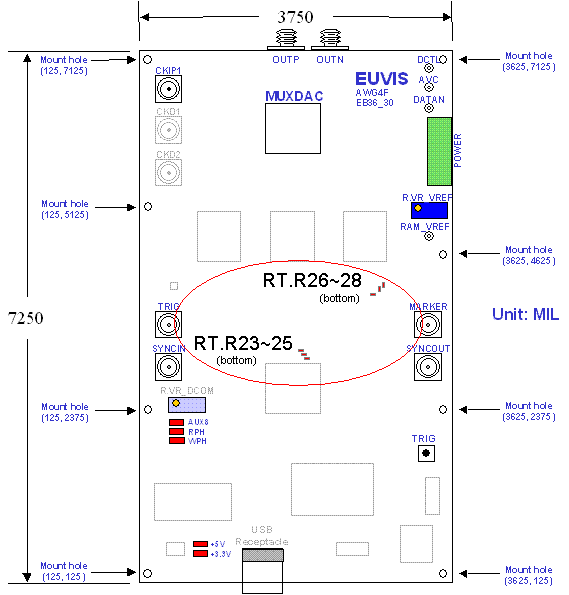
The locations of these resistors are on the bottom of the board, near the middle.
To ensure proper operation of the AWG251, one resistor on each of the three memory address lines allocated for paging [(either RT.R23 or RT.R26), (either RT.R24 or RT.R27), and (either RT.R25 or RT.R28)] must be open while the other resistor of each pair must be shorted.
|
Number of Pages (Maximum number of Waveforms) |
Memory Address Page Length | Memory Depth per page [hex] | Resistors to Remove (Open) | Resistors to be Shorted |
| 1 | 18-bit |
4M [400000] |
RT.R26 RT.R27 RT.R28 |
RT.R23 RT.R24 RT.R25 |
| 2 | 17-bit |
2M [200000] |
RT.R26 RT.R27 RT.R25 |
RT.R23 RT.R24 RT.R28 |
| 4 | 16-bit |
1M [100000] |
RT.R26 RT.R24 RT.R25 |
RT.R23 RT.R27 RT.R28 |
| 8 | 15-bit |
524K [80000] |
RT.R23 RT.R24 RT.R25 |
RT.R26 RT.R27 RT.R28 |
Please complete both steps of the board modification when making changes to the paging option. The modifications are summarized above, and the detailed instructions follow, below.
To Disable Paging
1. Remove any surface mount resistors at the six locations RT.R23~RT.R28.
2. Mount 0 ohm resistors (or short wires) at RT.R23, RT.R24, and RT.R25.
To Enable Paging (8-pages)
1. Remove any surface mount resistors at the six locations RT.R23~RT.R28.
2. Mount 0 ohm resistors (or short wires) at RT.R26, RT.R27, and RT.R28.
To Enable 2-page Paging (17-bit addresses)
1. Remove any surface mount resistors at the six locations RT.R23~RT.R28.
2. Mount 0 ohm resistors (or short wires) at RT.R24, RT.R25, and RT.R26.
To Enable 4-page Paging (16-bit addresses)
1. Remove any surface mount resistors at the six locations RT.R23~RT.R28.
2. Mount 0 ohm resistors (or short wires) at RT.R25, RT.R26, and RT.R27.