Configuration and Status Panel -
The Configuration and Status Panel is accessed by the 3rd tab. In this panel you can check on the internal status of the AWG module, configure the module as a master or slave for multi board operation, and set the guard length to delay a waveform.
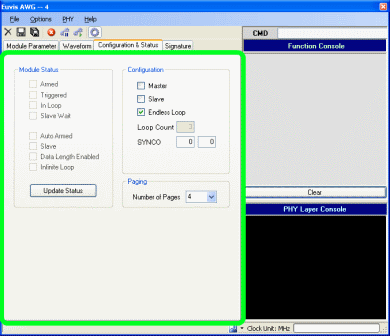
Internal States
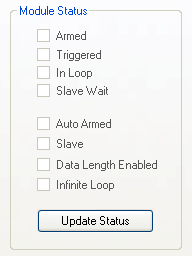
Module Status
Displays the current status of the AWG board. The status is not automatically refreshed. In order to see the most current status of
the module, you must poll its status
by clicking on the Update Status button.
Auto Armed - displays if board has Auto Armed enabled. When Auto Armed is enabled, the board automatically enters
the "Armed" state after the "Loop Done" state. For more information about the internal states please see the
Internal States page.
Armed - displays if board is in the "Armed" state.
Triggered - displays if board is in the "Triggered" state.
In Loop - displays if board is in the "In Loop" state.
Slave - displays if board is in Slave mode. When this option is not indicated, the board is in either Master mode or Free-running mode.
Slave Wait - displays if module is in the "Slave Wait" state, which is equivalent to the "Armed" state of the Master
or Free-running modes. In the "Armed" state of the Master or Free-running modes, the board waits for the TRIG signal to begin waveform output, while in the "Slave Wait" state of the Slave, the board waits for the SYNCI signal to begin waveform output.
Configuration
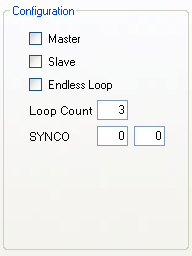
Master
When enabled, puts board into Master mode.
Slave
When enabled, puts board into Slave mode. For more information about multi-module operation, please see Multi-Module Operation.
Endless Loop
Enables continuous waveform output. With Endless Loop, the Loop Count parameter is ignored. If you wish to operate the module in burst mode, you must uncheck the Endless Loop box and enter a value for Loop Count.
Loop Count
Specifies the number of waveforms to output for each trigger signal. If you want an infinite loop or continuous output, please check the box for Endless Loop.
Guard Length
Sets the delay before the first waveform. This is useful for synchronizing the master and slave waveforms under multi-board operation. The default Guard Length is 40 (hex). Increasing the Guard Length corresponds to delaying the waveform output by 32 clocks (32 samples). You should be able to use the same value for the Guard Length on multiple modules if the coaxial cable connecting the Master SYNCOUT to the Slave SYNCIN is not too long. We recommend that you use a coaxial cable less than 3 ft. in length.
After you change the Guard Length, you must re-arm the board to see the waveform correctly.