DAC Control Panel
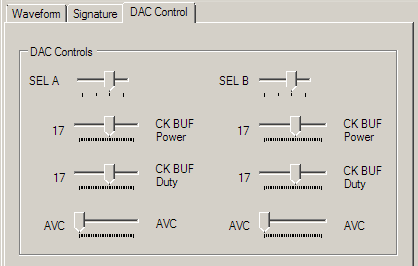
The DAC Control Panel is accessed by the third tab below the tool bar and menu bar, near the top of the application window. The DAC Control tab, shown in Figure 27, contains several controls for optimizing the AWG TRX's sampling hardware. The left and right sets of sliders control channels A and B respectively. The AWG TRX has been tuned and should be on the optimal setting by default, however, depending on ambient temperature, waveform type, and (for very long waveforms) waveform length, these setting may need to be adjusted.
DAC Controls

SEL A / SEL B
The SEL sliders select the sampling window (sampling 'eye') used by the A and B channel DACs respectively. If a waveform or spectrum appears noisy, adjust the SEL slider for the channel in question until a satisfactory waveform / spectrum appears.
CKBUF Power

Adjust the power level of the AWG TRX's internal clock buffers. Adjusting the clock power level can yield slight increases in signal quality.
CKBUF Duty

Adjust the duty of the AWG TRX's internal clock buffers. Adjusting the clock duty can yield slight increases in signal quality but it is recommended to keep the setting near 50% (around 15).
AVC

Adjust the analog, peak-to-peak voltage level of the analog outputs. Depending on output impedance, these settings may need to be adjusted so that both channels have the same output voltage level.