Application Window -
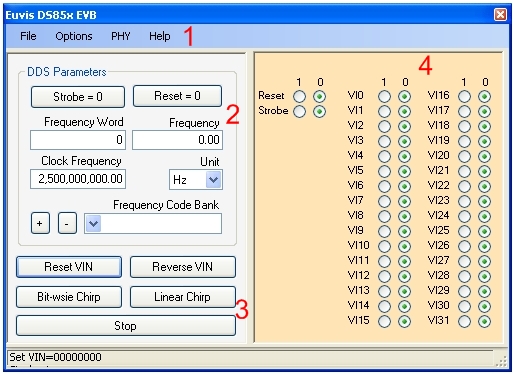
1. Menus
2. DDS Parameters
3. Advanced Options
4. Bit Select
Menu : File
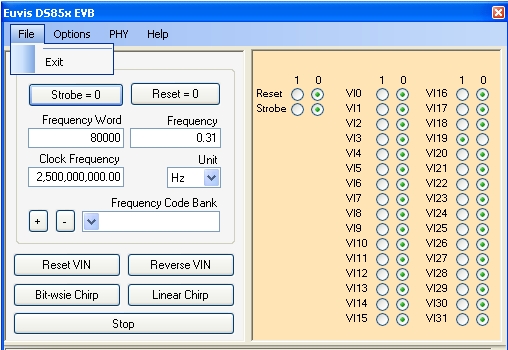
Exit - exits the program
Menu : Options
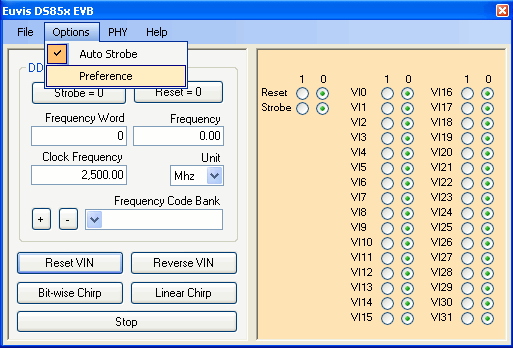
Auto Strobe - automatically updates output after user changes frequency. When this option is not selected, user will have to manually strobe in frequency changes using the "Strobe" button.
Preferences - brings up the Preferences window:
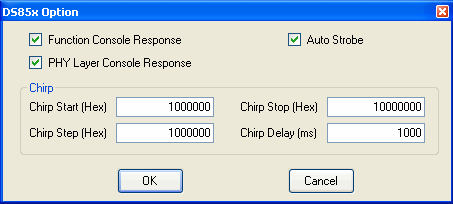
Function Console Response - when this is enabled, the program will write to a log file called "ds85x_evb.log". The program writes all instructions that are sent to the DDS board in the log file. When disabled, the program will not write to the log file.
PHY Layer Response - when this is enabled, the program will write to the same log file above all information it gets from the DDS board.
Auto Strobe - same as the Auto Strobe described above. When this is enabled, the program automatically updates output after user changes frequency. When this option is not enabled, user will have to manually strobe in frequency changes using the "Strobe" button.
Chirp Start - specifies the starting frequency of the Linear Chirp. You will have to enter the frequency word in hexadecimal format.
Chirp Stop - specifies the stop frequency of the Linear Chirp. You will have to enter the frequency word in hexadecimal format.
Chirp Step - specifies the step frequency of the Linear Chirp. You will have to enter the frequency word in hexadecimal format.
Chirp Delay specifies the delay between each frequency step. Specified in milliseconds.
NOTE: You can change the linear chirp parameters while the board is running a linear chirp. When you click on OK after you have made your changes, the board will instantly register the change and will chirp according to the new settings.
Menu : PHY
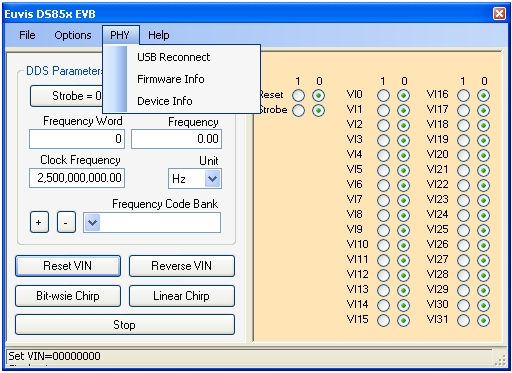
USB Reconnect - reconnects USB
Firmware Info - gives information about the firmware
Device Info - gives information about the DDS board